📡
Connessione Bluetooth / ANT+
Bluetooth / ANT+ Connection
Conexion Bluetooth / ANT+
Connexion Bluetooth / ANT+
Associare i sensori Uptivo al telefono
Pair Uptivo sensors with your phone
Vincular los sensores Uptivo al telefono
Associer les capteurs Uptivo a votre telephone
Prima connessione
- Attiva il Bluetooth sul tuo smartphone
- Accendi il sensore Uptivo (es. Belt D, Lightband)
- Apri l'app Uptivo e vai nella sezione Allenamento
- L'app cerca automaticamente i dispositivi nelle vicinanze
- Seleziona il tuo dispositivo dalla lista
- Attendi la conferma di connessione avvenuta
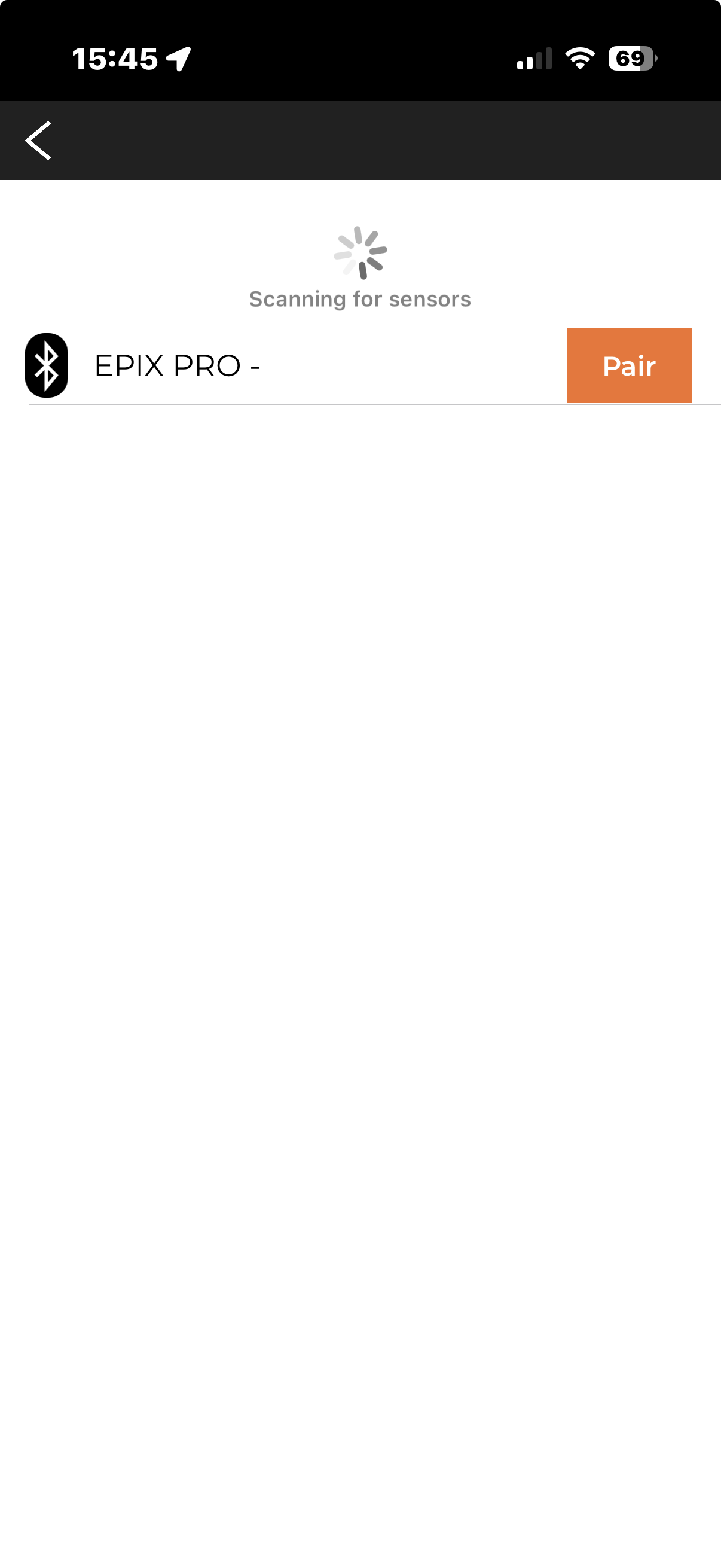
Ricerca dei sensori Bluetooth nelle vicinanze
⚠️
Non associare il sensore dalle impostazioni Bluetooth del telefono. La connessione deve avvenire esclusivamente dall'app Uptivo.
Protocolli supportati
- Bluetooth Low Energy (BLE): supportato da tutti i dispositivi Uptivo
- ANT+: supportato da Uptivo Belt D e Bridge (richiede telefono compatibile)
Connessione multipla
Puoi connettere piu sensori contemporaneamente, ad esempio:
- Belt D (frequenza cardiaca) + Boxing Sensors (movimento)
- Lightband come sensore HR per un allenamento con dati completi
Suggerimenti
- Tieni il sensore vicino al telefono durante l'associazione
- Assicurati che il sensore sia carico
- Se non viene rilevato, spegni e riaccendi il sensore
- Chiudi altre app che potrebbero usare il Bluetooth
First connection
- Enable Bluetooth on your smartphone
- Turn on the Uptivo sensor (e.g. Belt D, Lightband)
- Open the Uptivo app and go to the Workout section
- The app automatically searches for nearby devices
- Select your device from the list
- Wait for the connection confirmed message
Scanning for nearby Bluetooth sensors
⚠️
Do not pair the sensor from your phone's Bluetooth settings. The connection must be made exclusively through the Uptivo app.
Supported protocols
- Bluetooth Low Energy (BLE): supported by all Uptivo devices
- ANT+: supported by Uptivo Belt D and Bridge (requires a compatible phone)
Multiple connections
You can connect multiple sensors at the same time, for example:
- Belt D (heart rate) + Boxing Sensors (movement)
- Lightband as an HR sensor for a workout with complete data
Tips
- Keep the sensor close to your phone during pairing
- Make sure the sensor is charged
- If it is not detected, turn the sensor off and on again
- Close other apps that might be using Bluetooth
Primera conexion
- Activa el Bluetooth en tu smartphone
- Enciende el sensor Uptivo (ej. Belt D, Lightband)
- Abre la app Uptivo y ve a la seccion Entrenamiento
- La app busca automaticamente los dispositivos cercanos
- Selecciona tu dispositivo de la lista
- Espera la confirmacion de conexion establecida
Buscando sensores Bluetooth cercanos
⚠️
No vincules el sensor desde los ajustes Bluetooth del telefono. La conexion debe realizarse exclusivamente desde la app Uptivo.
Protocolos compatibles
- Bluetooth Low Energy (BLE): compatible con todos los dispositivos Uptivo
- ANT+: compatible con Uptivo Belt D y Bridge (requiere telefono compatible)
Conexion multiple
Puedes conectar varios sensores a la vez, por ejemplo:
- Belt D (frecuencia cardiaca) + Boxing Sensors (movimiento)
- Lightband como sensor HR para un entrenamiento con datos completos
Consejos
- Mantene el sensor cerca del telefono durante la vinculacion
- Asegurate de que el sensor este cargado
- Si no se detecta, apaga y vuelve a encender el sensor
- Cierra otras apps que puedan estar usando el Bluetooth
Premiere connexion
- Activez le Bluetooth sur votre smartphone
- Allumez le capteur Uptivo (ex. Belt D, Lightband)
- Ouvrez l'app Uptivo et allez dans la section Entrainement
- L'app recherche automatiquement les appareils a proximite
- Selectionnez votre appareil dans la liste
- Attendez la confirmation de connexion etablie
Recherche de capteurs Bluetooth à proximité
⚠️
N'associez pas le capteur depuis les parametres Bluetooth du telephone. La connexion doit etre effectuee exclusivement depuis l'app Uptivo.
Protocoles pris en charge
- Bluetooth Low Energy (BLE) : pris en charge par tous les appareils Uptivo
- ANT+ : pris en charge par Uptivo Belt D et Bridge (necessite un telephone compatible)
Connexion multiple
Vous pouvez connecter plusieurs capteurs en meme temps, par exemple :
- Belt D (frequence cardiaque) + Boxing Sensors (mouvement)
- Lightband comme capteur HR pour un entrainement avec des donnees completes
Conseils
- Gardez le capteur pres de votre telephone pendant l'association
- Assurez-vous que le capteur est charge
- S'il n'est pas detecte, eteignez et rallumez le capteur
- Fermez les autres apps susceptibles d'utiliser le Bluetooth